
Markly — Highlight & Save Any Page
Productivity ·
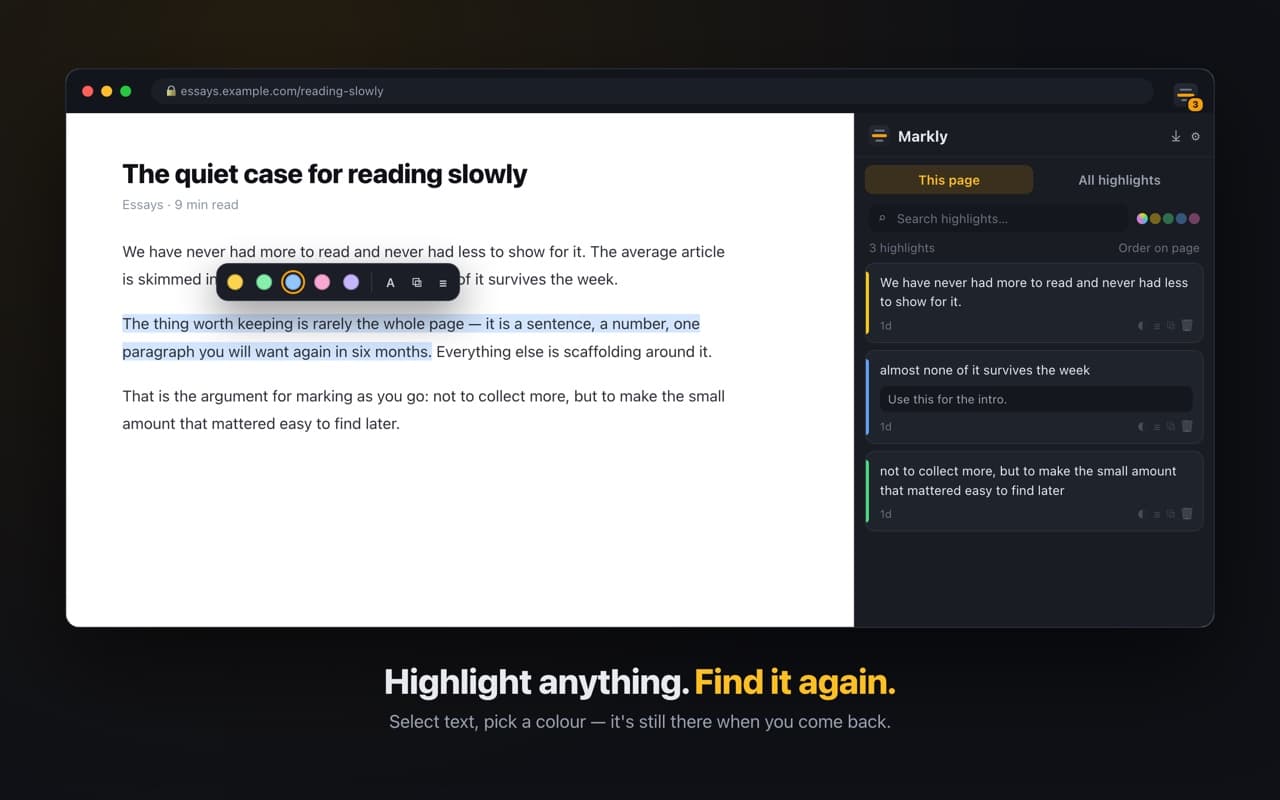
Highlight text on any page. Your marks come back when you return, and one panel keeps everything you've ever marked.
- Five colours, three styles, notes on any mark
- Search every highlight you've ever made
- Anchors survive the page being rewritten
The idea
Highlighting a page is easy. Finding the highlight three weeks later, after the site has restyled its article template, is the hard part — and that is the part Markly is built around.
Highlight the way you read
- —Five colours, so the interesting and the important don't look the same
- —Fill, underline or strikethrough, for pages where a block of colour is too loud
- —Attach a note to any highlight — it travels into the panel, the search and the export
- —Toolbar, right-click menu, or Alt+Shift+H
Marks that survive the page changing
Markly does not remember where on the page you highlighted. It remembers the words, plus enough of the text on either side to tell two identical sentences apart. When a site re-renders, injects an ad, or loads its article in a different order, the highlight still lands on the right sentence.
One side panel holds this page's marks in reading order, or every mark you've ever made grouped by page. Search runs across quotes and notes at once, and clicking a result takes you back to it in context.